

Github · GitHub Repository Radar
aibox22 readmeX
An AI Powered README and Interactive Wiki Generator for Any Projects. AI驱动的README及交互式Wiki生成工具,面向中文的开源DeepWiki。
Stars
522
Forks
26
Watchers: 522
Language
License: MIT License
Repository Radar Score
32 / 100
Growth
- 7d
- +0
- 30d
- +0
- %
- 0.0%
Not enough metric snapshots yet to chart growth for this repository.
Score breakdown
- popularity 46
- growth 0
- activity 15
- freshness 100
- community 56
Need help integrating this stack?
Our team builds with modern open-source stacks. Tell us what you are shipping.
Get a quote →English | 简体中文

🚀 AI-Powered README Generator: Automatically creates beautiful READMEs and interactive wikis for any repository! Can run all in local with your own models.
Explore the docs »
Table of Contents
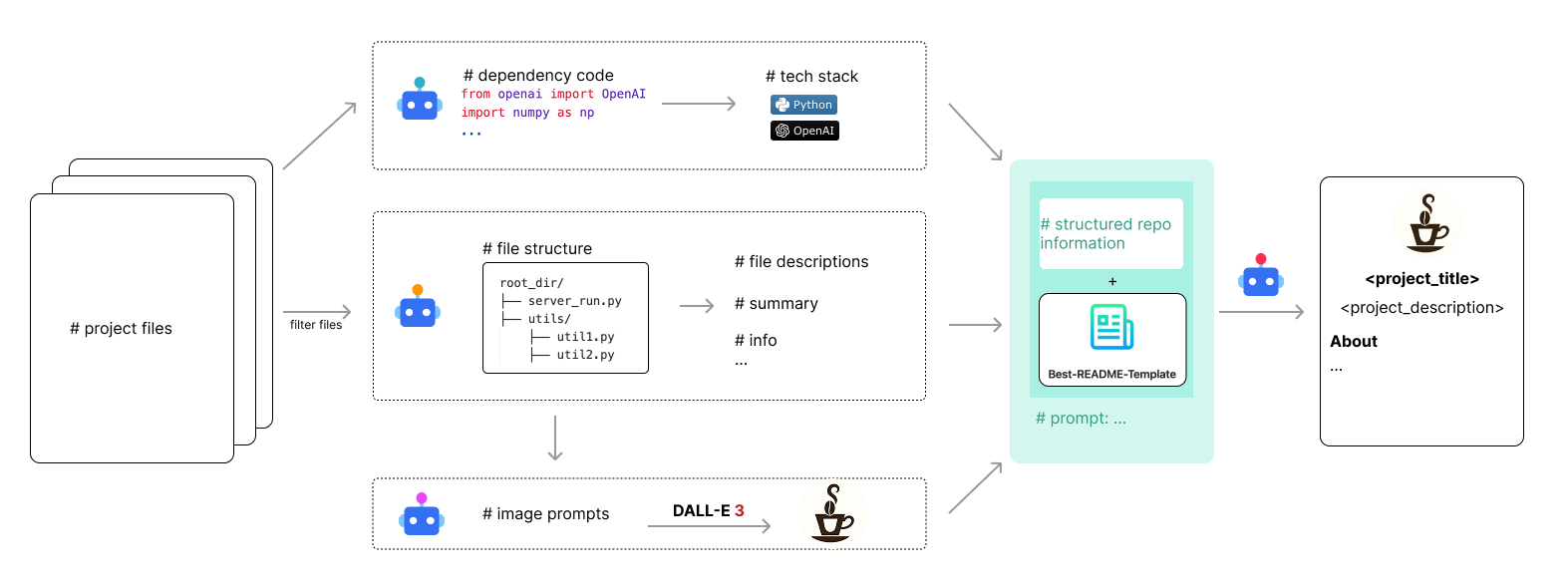
AI-Powered README Generator is an AI-powered tool that automatically generates comprehensive Markdown README files for your projects. It crafts well-structured documentation that includes project details, technology stack, setup instructions, usage examples, badges, logos, and more.
- 🤖 AI-Powered READMEs: Generate comprehensive Markdown READMEs instantly.
- 🔗 Auto Badges: Creates and embeds relevant status badges (contributors, forks, stars, etc.).
- 🖼️ Smart Logo Design: Crafts a unique project logo automatically.
- 🧠 Tech Stack Identification: Automatically detects and includes the project's technology stack.
- 🌐 Context-Aware Intelligence: Tailors content to your project's specific context and needs.
Click to expand supported languages
- JavaScript
- TypeScript
- HTML
- CSS
- SCSS
- Sass
- Less
- Stylus
- Pug
- Handlebars
- Mustache
- Twig
- Smarty
- Jinja
- Vue
- Python
- Java
- C
- C++
- C#
- Go
- Rust
- PHP
- Ruby
- Swift
- Kotlin
- Scala
- R
- MATLAB
- Perl
- Lua
- Dart
- F#
- Visual Basic
- Assembly
- Objective-C
- Haskell
- Erlang
- Elixir
- Clojure
- CoffeeScript
- PowerShell
- Shell
- Batch
- Solidity
- Dockerfile
- Makefile
- CMake
- Gradle
- Maven
- Nix
- Terraform
- Jupyter
- Protobuf
- GraphQL
- WebAssembly
- Vim
- Emacs
This is an example of how you may give instructions on setting up your project locally. To get a local copy up and running follow these simple steps.
- Python 3.7+
- Install the package using pip:
pip install readmex
readmex requires API keys for both the Language Model (for generating text) and the Text-to-Image model (for generating logos). You can configure these in one of two ways. Environment variables take precedence.
Set the following environment variables in your shell:
export LLM_API_KEY="your_llm_api_key"       # Required
export T2I_API_KEY="your_t2i_api_key"       # Required

# Optional: Specify custom API endpoints and models
export LLM_BASE_URL="https://api.example.com/v1"
export T2I_BASE_URL="https://api.example.com/v1"
export LLM_MODEL_NAME="your-llm-model"
export T2I_MODEL_NAME="your-t2i-model"

# Optional: Embedding model configuration for RAG (Retrieval-Augmented Generation)
export EMBEDDING_API_KEY="your_embedding_api_key"     # Optional, for web embedding models
export EMBEDDING_BASE_URL="https://api.example.com/v1" # Optional, for web embedding models
export EMBEDDING_MODEL_NAME="text-embedding-3-small"   # Optional, embedding model name
export LOCAL_EMBEDDING="true"                         # Optional, use local embedding model (default: true)

# Optional: Performance configuration
export MAX_WORKERS="10" # Optional, max concurrent threads (default: 10)For convenience, you can create a global configuration file. The tool will automatically look for it.
- Create the directory:
mkdir -p ~/.readmex - Create the config file:
~/.readmex/config.json - Add your credentials and any optional settings. You can also include personal information, which will be used as defaults during interactive prompts:
{
  "LLM_API_KEY": "your_llm_api_key",
  "T2I_API_KEY": "your_t2i_api_key",
  "LLM_BASE_URL": "https://api.example.com/v1",
  "T2I_BASE_URL": "https://api.example.com/v1",
  "LLM_MODEL_NAME": "gpt-4",
  "T2I_MODEL_NAME": "dall-e-3",
  "EMBEDDING_API_KEY": "your_embedding_api_key",
  "EMBEDDING_BASE_URL": "https://api.example.com/v1",
  "EMBEDDING_MODEL_NAME": "text-embedding-3-small",
  "LOCAL_EMBEDDING": "true",
  "MAX_WORKERS": "10",
  "github_username": "your_github_username",
  "twitter_handle": "your_twitter_handle",
  "linkedin_username": "your_linkedin_username",
  "email": "your_email@example.com"
}Once installed, you can use the readmex package in the command line. To generate your README, run the following:
readmex# Run the package directly
python -m readmex
# Or run the CLI module specifically
python -m readmex.utils.cli# From the project root directory
python src/readmex/utils/cli.pyAll methods support the same command line arguments:
# Interactive mode (default)
readmex

# Generate for current directory
readmex .

# Generate for specific directory
readmex /path/to/your/project

# Generate MkDocs website
readmex --website

# Generate website and serve locally
readmex --website --serve

# Deploy to GitHub Pages
readmex --deploy

# Enable debug mode (skip LLM calls for testing)
readmex --debug

# Enable silent mode (auto-generate without prompts)
readmex --silent

# Enable verbose mode (show detailed information)
readmex --verbose
This will:
- generate a
project_structure.txtfile, which contains the project structure. - generate a
script_description.jsonfile, which contains the description of the scripts in the project. - generate a
requirements.txtfile, which contains the requirements of the project. - generate a
logo.pngfile, which contains the logo of the project. - generate a
README.mdfile, which contains the README of the project.
- Prompt Engineering for Logo Generation
- Multi-language Support
- Enhanced AI Descriptions for Project Features
See the open issues for a full list of proposed features (and known issues).
Contributions are what make the open-source community such an amazing place to learn, inspire, and create. Any contributions you make are greatly appreciated.
If you have a suggestion that would make this better, please fork the repo and create a pull request. You can also simply open an issue with the tag "enhancement". Don't forget to give the project a star! Thanks again!
- Fork the Project
- Create your Feature Branch (
git checkout -b feature/AmazingFeature) - Commit your Changes (
git commit -m 'Add some AmazingFeature') - Push to the Branch (
git push origin feature/AmazingFeature) - Open a Pull Request
Copyright © 2024-2025 readmex.
Released under the MIT license.
Email: lintaothu@foxmail.com
Project Link: https://github.com/aibox22/readmex
QQ Group: 2161023585 (Welcome to join our QQ Group to discuss and get help!)

Scan QR code to join our QQ Group


Repository Radar analysis
Deterministic insights derived from public metadata and our observations — not personal testing or reviews.
Why this repository is interesting
- Listed in our discovery index with public GitHub metadata for analysis.
Who should use it
- Developers working primarily with Python
- Teams exploring AI tooling, agents, or ML infrastructure
Potential use cases
- Reference or evaluate Python open-source approaches in this domain
- Prototype AI/agent workflows or study reference architectures
Strengths
- README present in our index
- Declared license: MIT License
Limitations / considerations
- Insights are derived from public metadata and our observations — not a substitute for code review
What to watch
- Radar Score is modest — dig into activity and docs before committing
Source: GitHub (public metadata) + Repository Radar analysis. We do not claim ownership of third-party repositories.